Showing posts with label Android. Show all posts

Sunday, October 26, 2014

REVIEW: Moto X on Inland Cellular.

Hey guys! It's been a while.

Today I'm here to talk about a fairly new(UPDATE: Not so new) device in the smartphone world: the Morotola Moto X(2012).

The Moto X is a standalone device(Thus far anyway), although the Schaumberg Illinois based company has recently released several other new Android phones such as the Moto G, Droid Ultra, Droid Maxx and the Droid Mini.

NOTE: This review is not specifically a comparison to other devices and any other devices mentioned are used to compare basic functions or features such as size, weight etc. I could use any device, but for the sake of understanding, I picked a popular option with similar specifications for these comparisons. Furthermore, this review is not a "Vs" review. It's strictly my opinion on the device at hand.

The Motorola Moto X.


NOTE: This review is for the Motorola Moto X, XT1050 Android Smartphone.

Being one of the first in line of a new generation of Motorola phones, the Moto X is certainly a step up from older devices such as the Atrix line, Milestone line, and even the famous Razr lineup.

The Moto X is currently available on most US carriers, and the current 2-year contract price for the 16GB model at most stores is around $29.99 or free(Not taking into consideration the many discounts and promotions various carriers offer).

As some of you might know, I previously owned an Inland Cellular Motorola Razr Maxx XT912 that gave me problem after problem. It would reboot randomly, freeze up, overheat, randomly shut down wireless networks, it wouldn't connect to or see other bluetooth devices half the time...it was also very slow...the list goes on. You'll soon see that the Moto X(XT1050) has none of these issues.

When I was in the market for a new phone, it came down to two options....The Samsung Galaxy S4 or the Moto X...the only reason I bought the Moto X over the S4 is because the S4 wasn't available for purchase. It was a very close decision and I'm honestly very glad I ended up with the Moto X.

PROS: 
#1: Fits well in the hand without sacrificing screen size!
The Moto X screen is 0.1 inches smaller than that of the Samsung Galaxy S3. The S3's body is very large and finding a hand to fit it comfortably is tough. The body on the Moto X is 5mm smaller than that of the S3. How? I'll tell you! On every phone, there is something called Bezel. Bezel is the part of the phone that holds the screen in position. As companies keep creating and designing new things, their technology will therefore become more impressive. This applies to bezel; as more bezel is made, companies find new ways to make it stronger, allowing for less and less bezel to be necessary to the construction of the device.

#2: Extremely fast.
The Moto X has accomplished(What seems like) wonders when it comes to running apps, processing information of any kind and keeping wireless connection speed consistent.
I actually broke one of my own rules and downloaded a game! Sure, it relies on an internet connection so its not as much of a process hog as other games, but still...amazing. For full specs, see this link: Moto X Specs.

#3: Clean Android experience without MotoBlur or other software getting in the way.
Sure, it has Motorola apps like Motorola Assist, Motorola Migrate, MotoCare, and Motorola's own camera app, but none of them bog the system down like some other custom software might on other manufacturers phones. Plus, the aforementioned apps are actually useful unlike the dreaded "Bloatware" found on other devices.

#4: Camera(s).
The 10MP camera on this device is certainly special! I went from an 8MP on my XT912 to this 10MP on the XT1050, which may not seem like a huge step up, but it is when it comes down to it. Its cleaner, more stable(Although not by a huge margin) and the settings are easy to access and modify.
The front facing camera is quite good for being only 2MP. The light adjustment on both front and rear cams is a huge improvement and does its job very well.

#5: Color options. Although this really only applies to a few carriers and its online only.
With most carriers, you only have the black and white options available.
Below are the carrier options for the Moto X color customization as well as some of the color options available.

#6: NFC, among other modern settings are available. It's a fast way to transfer files, pair with devices without having to take the long route with bluetooth settings(Although it still uses bluetooth to maintain a connection) and in some cases, make electronic payments(If you have a protective case on your phone, this feature may not work properly).

#7: Completely Hands Free(If you so choose). There is a marvelous setting that enables full control over the device by using your voice. Even with the screen turned off! Go into settings and enable the Touchless Control. All you have to say is "Ok Google Now" at any time and then give it a command.

#8: The Moto X offers a wide variety of features previously available only through 3rd party apps or that are unique to this phone entirely(So far). Keep in mind, some features may be available on other devices, but if they are, I have not heard about them, so correct me if I am wrong.
The list of features include Texting from your PC, Touchless Control(As mentioned in #7 above), Active Display(See #9 in Pros), Camera wrist gesture(See #10 in Pros).

#9: Active Display! This feature is quite amazing as it allows the user to check for notifications and or the time without turning the screen on. If your phone is in a physically stable environment(NOT a moving car on the back roads of Idaho), you can simply tap the screen or bump the phone(or any similar jarring) and the screen will provide you with an unlock option, time, and any current notifications you haven't seen yet. Sliding up into the notification will take you to the app that the notification originated from. Sliding down will unlock the device.


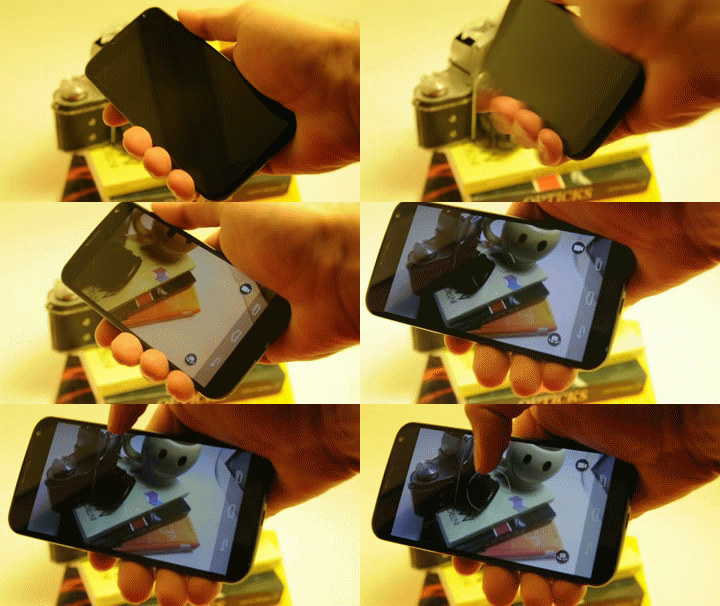
#10: Camera Gesture Control.
One of the cooler features the Moto X has is the ability to activate the camera(Stock camera only) by twisting the phone back and forth quickly a few times as seen in this GIF Image.

#11: KitKat! The Moto X released with Jellybean(Operating System version 4.2.2) but is upgradable to Android 4.4 KitKat. KitKat releases many improvements, some of which aren't readily noticeable.
These features include the ability to set your default home screen(Launchers like Themer, Aviate, Next, Nova, etc) so apps like Twisted Home Manager aren't necessary, Touchless Control bug fix(Updated version required a SIM card to make phone calls. With 4.4, no SIM card is necessary), Dialer/Contact apps are now practically combined while maintaining their own entities, and much more.

#12: Android 5/L/Lollipop! Whatever people call it, the next OS after KitKat has been confirmed for the Moto X down the line when Google and Motorola get their crap together.

CONS:

#1: My biggest qualm with this device is the lack of MicroSD storage expansion. This means if I want to store music or videos on my device...well, I'm very limited as to how much I store. Of course with the ever growing cloud industry, this isn't a huge problem unless you don't have 24/7 access to wifi or cell service(And even then, almost all carriers have limits on their data and its expensive to go higher than 4GB). Also, the 2GB of RAM and 16GB of storage built in isn't bad...
My solution to this issue however, relies on the fact that the Moto X is OTG(On the go) storage compatible.
This means I can plug an adapted USB flash drive or adapted SD card/micro SD card into it and it will work.

#2: This one is small but its still significant if you like to save time when navigating through the system.
When on the Recent Apps screen, you can swype the apps away(Kills the application to save processing power) and one most phones, there's actually a button(on screen) to remove them all at once. The Moto X doesn't have this button and if I have more than 5 apps open, it can be a pain to remove them all slowly.

#3: Battery Life.
Ok so I know that I was spoiled with having a Droid Razr Maxx(extended battery life as compared to normal Razrs) but even for the average smartphone, the battery life on the Moto X isn't that good. I usually charge it overnight and unplug it at 5:30AM and use it throughout the day until late at night(Roughly 9 or 10PM). By midday(12PM Noon), my battery is anywhere from 57% down to 43% and dies before 8PM, where my Razr Maxx would still be at 89% down to 73% and would last until 11pm(With about 13% left).
Of course the solution is an external battery pack or one of the very few battery cases manufactured for this device, but those aren't cheap and it would be responsible manufacturing where the battery is made to last all day. This is the 21st century and people are constantly on their devices. The average smartphone user checks their phone 110-150 times a day. Pretty battery draining if you ask me.

#4: Battery is non-removable. This really speaks for itself.

#5: Limited bloatware. As I stated above, the Moto X does come with some Motorola bloatware, and while it doesn't affect the system in any way, it's still slightly annoying to not start from scratch like most people want.

#6: Limited camera options and speed.
The stock camera is not what I'd call very good...it's slow, has limited settings and has seemingly primitive light adjustment and focus. That's why I suggest going the route of reliable 3rd party camera apps like Focal, A Better Camera, or even VSCO Cam. These among many others are great alternatives and offer a wide range of options, advanced settings and faster shutter speed(For shutter speed and efficiency, I recommend Focal). Granted, some of these aren't supported on all phones or tablets, they're still supported on a great many. NOTE: Google Camera is now available for the Moto X and its AMAZING.

#7: Wireless charging capabilities....while you're technically able to wirelessly charge the Moto X, no one seems to have a definite answer for this or to how easy it is. I did find one 'solution' that requires a specific wireless charging case and a charging mat. Not worth my time, especially if I own a protective case that I don't want to have to take off and on to swap with the charging case/sleeve. The idea behind wireless charging is to be quick and 'no hassle'.

#8: Absence of Notification Light.
As a smartphone user who relied heavily on notification lights to tell when I need to check my messages, this was a big disappointment. However, with the active display, this almost becomes an anti-con.


Summary And Conclusion:

Overall, I am very pleased with the Moto X as my everyday and business device. It has a solid construction, and it runs very smoothly. Its been almost a year since I have purchased this device(This review is VERY VERY late) and it still runs as fast as when I purchased it(Hint: VERY FAST).
Bottom line: Buy it if you're looking for a good phone that's affordable on or off contract.
The NEW Moto X has been released and I do recommend checking that out too.

I give this device a solid 4.5 out of 5 stars.

Thanks everyone! Have a FANTASTIC day! :)

~ARGOS~

Tuesday, February 19, 2013

Ubuntu Mobile OS and all that jazz....

Some pretty exciting things have been happening in the mobile world lately, this morning especially.

To list a couple that stand out:
The HTC One phone was unveiled/Announced this morning. Cnet was one of the many organizations covering the event. The phone is said to run for $199.99 for 32GB version and $299.99 for the 64GB version. THAT my friends, is marketing. It has 2GB of RAM, a 1.7 GHz Quad Core CPU(Qualcomm Snapdragon), a 2.1MP front facing cam and a 4MP rear cam with Ultra Pixel technology which apparently makes the image the equivalent to a 8-13MP cam. So don't judge before you try it!
 
http://news.cnet.com/8301-1035_3-57570015-94/htcs-one-phone-to-rule-them-all-meet-its-latest-flagship/


The Ubuntu Tablet OS was revealed today, making it the 4th platform Ubuntu is officially on. They have covered TV, Smartphones(Releasing Oct. 2013), and Desktop/Laptop computers.


 http://www.engadget.com/2013/02/19/ubuntu-for-tablets-revealed/

I plan to make the eventual switch to 'everything Ubuntu', but until that day comes, I've been working on getting everything over to Android, or Android compatible, in a manner of speaking.
Since Ubuntu and Android share the same Kernel(Linux) it will be simple to run the two OS's side by side without having to reboot or change much of anything.

That does it for today, the interwebz are abuzz with more articles and resources pertaining to these two subjects I've covered, so enjoy the browsing!

~Wilson1~

Tuesday, October 23, 2012

ASUS Transformer Pad Infinity TF700T REVIEW.

ASUS Eee Transformer Pad Infinity TF700T Android Tablet. 

Ok...so I know that I said I might do an unboxing video or something similar for my ASUS tablet, but I kinda....geeked out before I could even remember that. I was so excited that I didn't wait to customize it...and it's so far now that I even now have the new OS on it! So seeing that I can't really do an accurate unboxing...I will just do a review on it.

Ok, to start it off, the stock specs are as follows:

Android OS 4.0.4 Ice Cream Sandwich. (Upgradable to Android 4.1 Jelly Bean and very possibly Android 4.2).

8MP rear camera, 2 MP front facing camera.

64GB storage, up to 32 more in MicroSD card storage.

Full HD 1920x1200 Super IPS+Panel screen(VERY nice viewing).

Nvidia Tegra 3 Quad-core 1.5-7 Ghz Processor.

Corning Gorilla Glass 2 built in screen protector.

Up to 9.5 hours of battery life.

And now for more detailed specs by category(Below):

DISPLAY:
 Physical size: 10.1 inches
Resolution: 1920 x 1200 pixels
Pixel density:  224 ppi
Technology:  Super IPS+ LCD
Touchscreen: Capacitive, Multi-touch
Features: Light sensor, Scratch-resistant glass

HARDWARE:
 System chip: NVIDIA Tegra 3
Processor: Quad core, 1600 MHz
Graphics processor: 12-core GPU
System memory: 1024 MB RAM
Built-in storage: 32-64 GB
Storage expansion: microSD, microSDHC

CAMERA:
Rear Camera: 8 megapixels
Flash: LED
Aperture size: F2.2
Features: Back-illuminated sensor (BSI), Auto focus
Camcorder: Yes
Features: Video calling
Front-facing camera: 2 megapixels

Includes GPS, Navigation, Youtube, Picasa, Calender, Alarm, Document viewer(Polaris Office) and a nice Calculator.
The stock e-mail client supports the following domains: IMAP, POP3, SMTP, and Microsoft Exchange. There are a few other ASUS added apps but none of them are extremely important. They are mostly things like netflix, zinio(like netflix) and similar media apps.

MY REVIEW:

Basically, I searched for 5-6 months on what the best tablet was. I found out that this was it, based on my searching.
I saved up for it, and then bought it. For me, it was just me trying to buy the best for my money that ISN'T an apple product, and I am also a huge geek/nerd so this was kinda big for me.

I had high expectations for it, and this device definitely met them. I love it. Ive had very few problems with it, and the problems I HAVE had are because of certain websites not being 100% compatible with my tablet. I've got a laptop. That and the occasional lag from a background process that insists on struggling. No biggie.
Other than that....nope. It's all awesome and good. I love the camera(8MP), the storage(64GB) is certainly wonderful and I have YET to make a dent in it, the screen is phenomenal, very clear and its hard to spot the individual pixels.

The OS(Operating System) is very nice, although I am currently using 4.1.1 instead of the stock OS(4.0.4). I got the upgrade almost immediately after I started using it. So if any of you still plan on buying this and want to go straight to Jelly Bean(4.1.1) you don't have to worry about a thing. BUT if you want to keep Ice Cream Sandwich(4.0.4) for a while, no sweat, just don't initiate the firmware update.

It's extremely thin for a tablet, which makes it very nice to use, it feels good in the hands, there is a weight behind it due to the metal casing and strangely enough, your hand can grip it quite nicely.

You can get it in about...2 or 3 different colors or in my opinion "Shades".

Overall, I am very happy with this product and I recommend it if you are looking for a high end tablet without going apple. Some may argue that Samsung or Toshiba are better, but it's all personal preference, and they all have their strengths and weaknesses.


I hope this makes your decision easier! Here are some pictures I took with my phone along with a screenshot of my home screen with a false location.

If you have any questions concerning extra features or app compatibility etc, let me know! I believe my e-mail is listed, if not, comment and I will change that.

~Wilson1.

Saturday, July 21, 2012

Android fun!

Hello again!
I am here today to talk about the Android OS, devices that run said operating system and maybe a few other things.

Can you believe they released Android 4.1 already?? It's typically named after a candy or sugar food: Jellybean.
I find it quite ridiculous that they would release this OS when the last one(Android 4.0, Ice Cream Sandwich) isn't even installed on 40% of capable devices...but that is the way of this world apparently.
It is quite new...so that might explain the inconsistencies in the stability and capability within different devices. A few posts ago, I touched on the subject of Android being so sporadic with it's reliability in different devices, and I must say, they are changing their game quite a bit. While there are still all over the place, it's not anywhere near as bad, PLUS the devices are becoming quite amazing. Good specs, reliable equipment, nice looking hardware, etc.
A few examples of this game change are the new Nexus Series by Google, Samsung and ASUS. The Nexus 7 is the new Google tablet. Affordable, looks nice, good specs. The Galaxy Nexus is the new tablet manufactured and branded by ASUS, my favorite brand in this market. Researching that would do you good. ;)
Aside from those, we have the Samsung Galaxy S III, the HTC One series(One X, One S, One V) and the countless new LG phones, plus ALL those new Droid phones by Motorola.
In the tablet world, we have the good ol' ASUS bringing us the new TF300 and the TF300G transformers plus the Transformer Infinity.

Most all of these devices are the top end smartphones/tablets on the market and they are starting to make a real impact in the general market of electronics and personal devices.


So I will end here, with a picture showing some of the devices discussed today.
I apologize for the scattered manner in which I presented this information, I am a little tired and it's kinda hot if you hadn't noticed...

~Wilson1.

Sunday, June 10, 2012

Windows 8, ASUS and Android shtuff.

These days there are SO MANY different companies making electronic devices such as phones, tablet, 'phablets' smart watches, etc.

I am here today to talk about some specifics: Android 5, Windows 8 and of course the one to get both of those OS's first....ASUS.

I mainly wanted to discuss some of the controversy and lack of ethics on the corporations end.

Figure#1:
Android is fast growing. So fast, that most device manufacturers can't keep up with the changes in software or they just can't manage to run the OS properly on whatever CPU the device has. It's a total mess. If the corporations would work together to make all of the devices compatible or equally able to run AndroidOS, things would be amazing. My 'outdated' smartphone would then be able to run Android 4.0. But NO, they insist on being difficult....
And then there is this whole Android 5 thing! AOS 4.0 isn't even on 15% of 'droid devices yet!! I disapprove personally. I think they need to stabilize the current versions with the current devices and THEN release the new OS. 

Figure#2:
Windows...ah Windows. We all love you except those who don't.
I have always been Windows fan, and not just because it's what I was raised on. It's simply my style. Mostly. If I was able, I would change some of the interface options and ability, but that's only because I am a huge sci-fi tech geek.
The new Windows OS: Windows 8 has received many responses. Some good, some not so good.
Most of the good responses were just people getting excited about something new and mobile. Same ol' same ol'. The bad responses(totally valid too) were mostly people complaining that it will take away from the Windows feel, that if they are going to make a mobile OS, keep it separate like they did with WP7.

My personal response to this issue: I agree with both sides. That's pretty much all I can say.

Thoughts? Did I get my facts wrong? Mess something up? Make a typo(God forbid...)?
Anyways, just let me know what you think on these topics.

~Wilson1.

Monday, April 23, 2012

Asus Eee Pad Tablet...and Shtuff!

Hello all, I am back!

I wanted to talk about a piece of technology in a category that I find fascinating: TABLETS!! Ok so the actual tablet is the ASUS Eee Pad Transformer Prime Tablet. Long name, best in the lineup.
The AEPTP runs the 4th version of the Android OS; Ice Cream Sandwich, or ICS. It also rocks an Nvidia Tegra 3 1.3 Ghz Quad Core processor, which considering it's a tablet, is pretty nice! It's only 0.2 Ghz below my LAPTOP processor, although my CPU is made by AMD and not Nvidia.
For excellent viewing capability, it has a 10.1 inch screen, I have no idea what type though so don't ask me. Go look it up. Please. Aaand it has a 8mp rear facing camera with a 1.3-2mp front facing cam. Not bad. ALSO you can choose between the 16GB model or the 32GB model, both running with 1GB of RAM.
And with all that geek nerd talk aside, let's go into WHY I would spend my money on such a device. And why not. First of all it looks nice...what with it's optional docking keyboard....which will cost you an extra $100 to $140....no thanks. I've got a laptop.


First of all, this AEPTP is supposedly the top ranking Android tablet on the market, and from I've seen, I'm not about to doubt it, UNTIL companies start releasing new devices of their own. I heard that Asus is releasing new models of this already, so I don't know if I should wait....

Ok no, I'm not waiting, unless not buying it until June counts...by then the new models will probably be on the market...

Sidetracked...let's move on to why NOT?

Apparently the Texas Instruments OMAP 5 Processor blew the Nvidia Tegra 3 out. Of. The.Water with a webpage rendering test. But who knows, the variables could have been inconsistent.

So all in all with my sketchy review, I would say YES I am going to buy it. Because I had hands on experience which I failed to mention. Oops.
The main reason my review is sketchy is because I want you to research it from more reliable sources. Mine might be biased. Slightly.

Anyway, have a greeeaat day you all!!!

~Wilson1.